 Cassandra.org
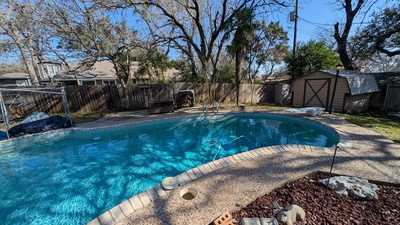
Before
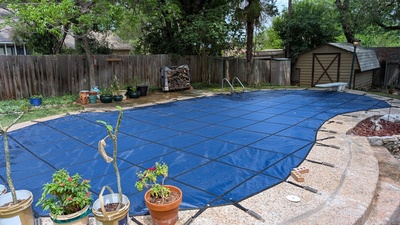
After
Background
I've not covered my pool for the last 20 years or more. Winters are generally mild here, so freezing is not an issue. I did cover my pool further back than that a couple times and I determined the hassle of it was not worth it. This was the normal cover type that lays on the pool and with water bags to hold it down. This results in water and debris accumulating on top of the cover and by the time you have to take it off, there's a muck of things and a brown soup. Taking it off without that getting into the pool was nearly impossible. The water bags tended to move and break which would cause more issues needing attention.
However, since we've wanted to travel for more extended periods and have the freedom to travel at any time of the year. When the leaves are falling in early to mid December, the leaves need to be skimmed/removed 2 to 3 times a day or else it will clog and burn out the pump motor. A pool service company normally comes once a week and even if they do a good job (which is a big if), that would not be sufficient many times of the year. Paying them to come multiple times a week starts to get very expensive, and needing them many times a day would be like paying someone a full time salary.
The only way we can have the travel freedom we wanted without returning to a complete disaster in the pool is to cover the pool. This prevents debris from falling in and extends the time it can go without adding chlorine. Given my previous experience with pool covers, I went looking for something better.
I needed what they call a "safety cover". This means a cover that lies taunt above the water at the level of the decking. It is held tight by straps attached to springs with the springs anchoring into the pool deck. Because it it flat, debris does not accumulate, or if it does, you can use a leaf blower or brush to easily remove it. The cover itself is also a fine micro-mesh that allows water to go through, so water does not accumulate either.
Shopping
I knew safety covers were more expensive and I had set my expectations at around $3,000. I also wanted a good quality cover, not the cheapest one. I found a few places to send of a request for quotes and got ranges from $8,000 to $9,500. Too much.
I then got some advice from the Trouble Free Pools forum to check out Pool Covers Direct. The name of the place makes it sound either low budget or scam-my, but that forum has a good reputation, so I have them a try. Turns out that they simply contact all the different manufacturers and get quotes for you. The pool cover manufactures do not (can not?) sell directly to individuals, so this company acts as an intermediary. The person I dealt with there was amazingly helpful. Given she was not affiliated with any one manufacturer, she could give me some more honest views on the the quality versus cost decision. She was also super knowledgeable and helpful for general pool cover information.
In the end, I got a high-quality cover for around my expected $3,000 price point. The main difference was this was the prices just for the cover. The previous quotes included measurement and installation. As you will see below, measuring and installing is a fair amount of labor, but it is nowhere near an extra $5,000 to $7,000 of effort.
Measuring Pool
To get a quote on a pool cover, you need to give them precise measurements of your pool. My pool is a custom kidney/hourglass shape and they need to know the exact shape. Just telling them 36 ft. by 45 ft. is not enough. Since I am not the only person with an odd custom pool shape, and since pool covers is their business, it should not have surprised me that they have solved this problem. The solution is: trigonometry.
They call this the "A-B Method" and it involves picking two reference points (with some constraints), then measuring the distance from these two points to points around the pool perimeter. The two measurements, and the known distance between the two reference points gives you three sides of a triangle, which is enough to work out the angles and the exact location of the pool perimeter point relative to the reference points.
We got two straight metal rods, sunk them in the ground a few feet from the pool near either end. This established the two reference points. We then used duct tape at various points around the pool perimeter and drew a perpendicular line with a sharpie to mark the perimeter point. Now all that was left was the tedious work of measuring from each reference point to each perimeter point. The bookkeeping was the most important part to make sure the right measurement got written for the right point.
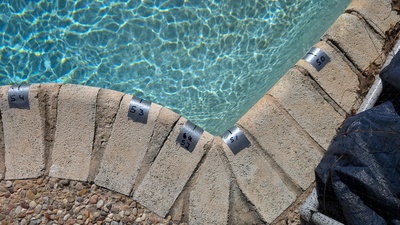
Sharp corner point marking
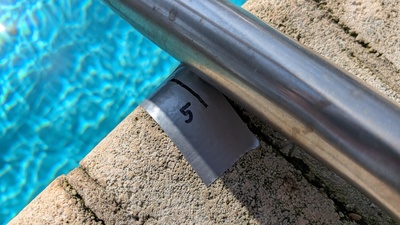
Narrow space around ladder
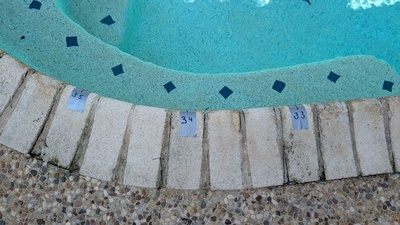
Marking pool edge points
Now, I could have just sent along the table of numbers I captured for the quote, but what if it had a mistake? Instead, I wrote a small computer script to plot the points myself to visually verify that it both looked like my pool and there was no obvious wrong data points. The result of my script plotting looked like this:
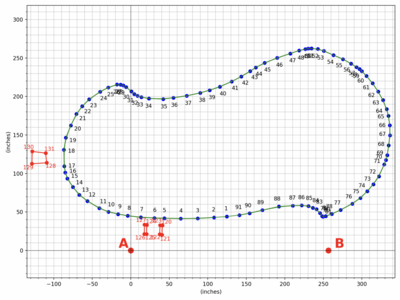
Plotting pool measurements
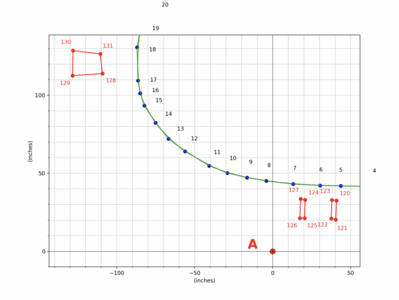
Plotting pool measurements (closeup)
The source code for that plotting script is at the end of this write-up.
Before sending the table of numbers and the diagram, I added some annotations.
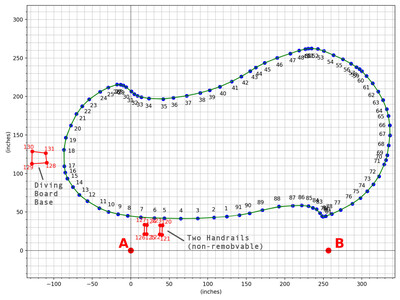
Annotated pool measurements
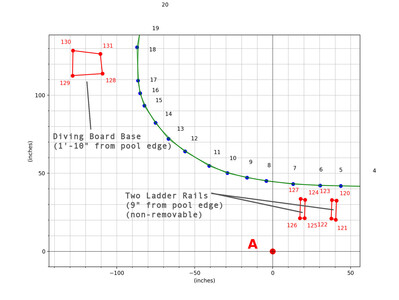
Annotated pool measurements (closeup)
For the initial quote, I did not have those 100 or so points you see in the images above, I only had about 50 and it had some borderline measurement errors. When I was ready to make the purchase, I wanted the measurements that they used to manufacture it to be more precise. We had improved our measurement technique by then.
Cover Delivery
It only took a couple weeks for them to make and deliver the cover.
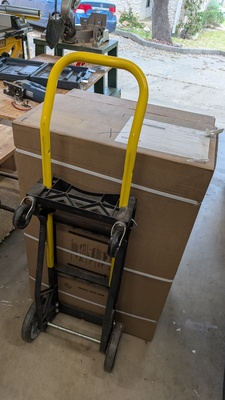
Cover box on dolly
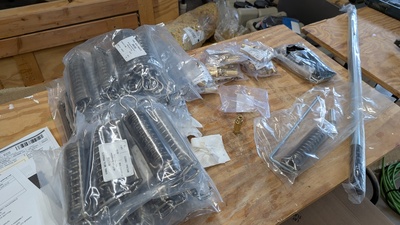
Parts after unpacking cover
The brass anchors would be the main focus as drilling the holes for these was were the real work would be. Their installation tool was used to both make sure the holes were drilled the proper depth and also as a protective punch-like shield when hammering them in.
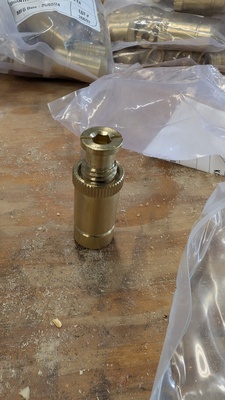
Cover anchor closeup
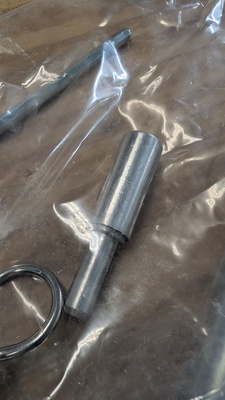
Anchor installation tool
Laying the Cover
The cover is held down by straps attached to springs attached to anchors. Since it is a custom cover, the locations of the straps is whatever custom layout they created. The only way to know where to drill the holes is top lay out the cover and see where they land. However, the more immediate initial question before any hole is drilled is: Does the cover fit?
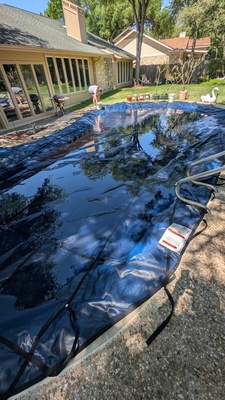
Checking cover fit
There was the measuring of the pool, the transcription of a couple hundreds numbers to paper, then transcribing them into electronic form to submit via email. All those steps were prone to errors and that does not considering the possible errors on the manufacturing side. It was all abstract and academic up to this point. Only with the physical cover laying across the actual pool would we know whether or not something had gone wrong. It was a happy moment when the cover was a very good fit.
We needed to make sure the cover was somewhat taut on the surface since that is where the straps will normally be aligned to. Many water buckets and planters were used for this.
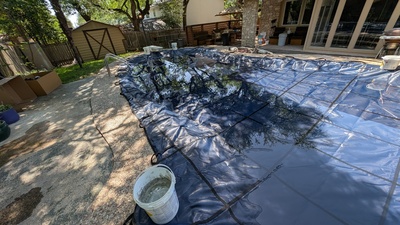
Weighing cover down
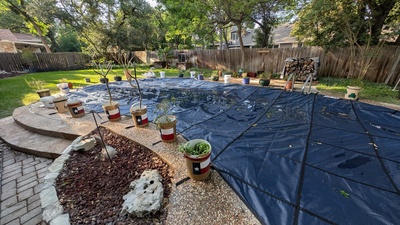
Cover at start of anchor installation
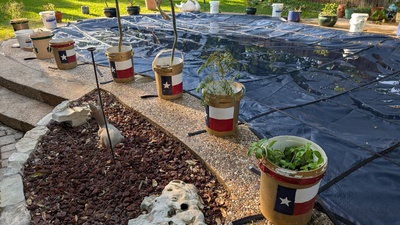
Cover during anchor installation
Drilling the Anchor Holes
Many years prior I had looked into buying a safety cover, but the prospect of drilling holes in the concrete pol decking bothered me. I did not want to compromise the structural integrity of the deck area or encourage cracks. I needed to get over this for this project and in the end, given the size of the holes, my concern was a bit overblown.
I had a lot of anxiety about drilling the holes for the anchors. Besides the initial worry about the impact on the deck integrity, I was not sure how easy it would be nor how precisely I could drill these holes. My deck is not a uniform masonry deck, but is a pebble-like finish with many embedded rocks of varying degrees of hardness. I suspected an ordinary masonry drill was not going to work due to the extra aggregates and that was confirmed on the very first attempt to use it to drill a hole.
I had bought a 3/4'' diamond drill bit as well as the regular masonry bit, so after the masonry bit failure, I moved to that. It was able to cut through the stones and did so with a relatively clean hole, but it took a lot of time and effort to drill just one hole. The first hole took over 30 minutes to drill and I had to drill 44 holes.
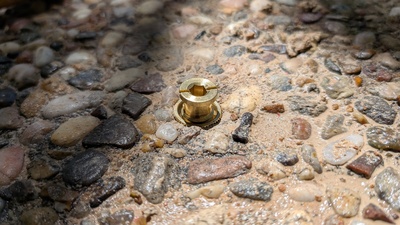
Anchor installed closeup
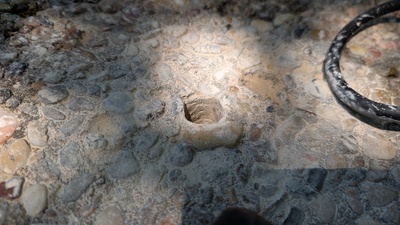
Anchor hole closeup
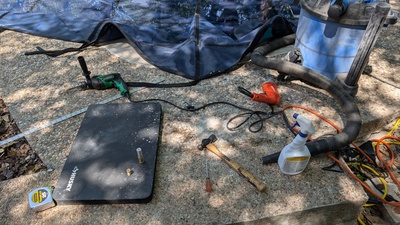
First anchor hole drilling setup
With the first hole drilled, you install the anchor by press fitting it. A rubber mallet with a special aluminum striker is used to hammer it in without damaging the relatively soft brass. The anchor is a threaded sleeve with a screw-down bolt with a lit for the spring to sit on. You unscrew it down to be flush with the surface when the cover is not on, and screw it up to expose enough of the lip for the spring to catch onto.
The springs are somewhat cleverly designed. You would think that the tension of the pool cover would be such that the spring gets expanded as the cover pulls on it. However, it actually gets compressed as the cover exerts force by using two interlocking metal brackets that apply the force in the opposite direction. Thus, maximum tension is limited and can be seen as a fully compressed spring. Otherwise, an overloaded spring would continue to stretch beyond its elastic limit.
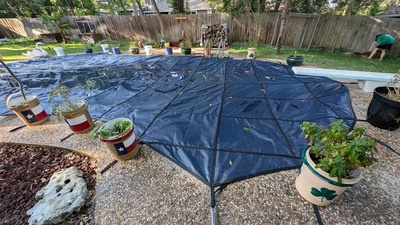
Cover after first springs installed
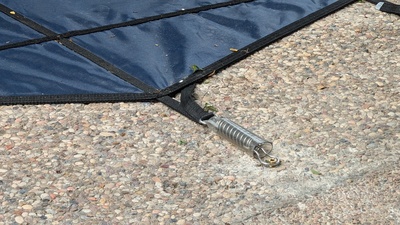
Spring installed view
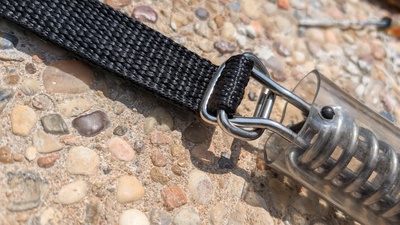
Cover strap and spring closeup
The drilling process was tedious. You had to keep it lubricated with water, would have to stop to chip out the concrete after every few millimeters, vacuum out the debris, etc. And you also needed to make sure you drilled perpendicular and did not drill too deep, so had to constantly measure and align. We eventually got to a pace of about 3 holes an hour, but this was still two and a half solid days of nothing but driling holes.
Diamond Bit Education
I began the project thinking all diamond bit were created equal. I left the project with first hand knowledge that there is a significant difference between the variations. My education began after seeing my first diamond bit wear out after 2 holes. This meant I would need a total of 22 diamond bits to complete the job. This was my first hint that there must be something wrong with my understanding because no one is going through drilling bit at that rate.
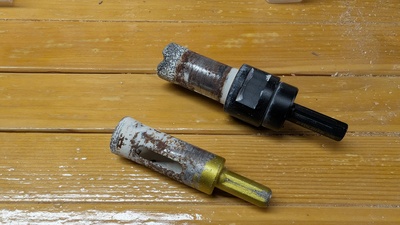
Diamond drill bits
The key differences in diamond bits are the method they use to adhere the diamonds to the metal. The run-of-the-mill bits are brazed, the next best are electroplated and the best (for durability) are sintered. For my project, the lifetime durability of each is is 2, 5 or 20 holes.
I really needed a sintered bit, but on a site like amazon.com, most merchants do not include any more detail than it is a diamond bit. However, with persistence, I located a sintered bit and it was no where near as expesive as I had feared: just a few dollars more.
Installed Views
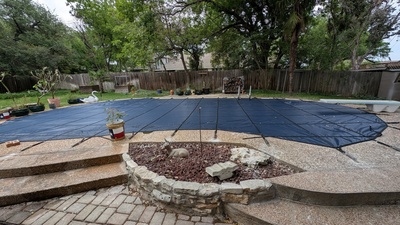
After installation (south)
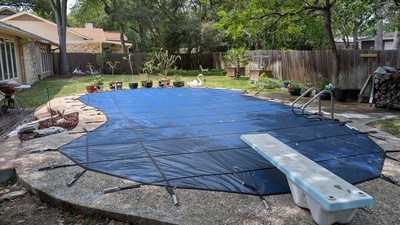
After installation (east)
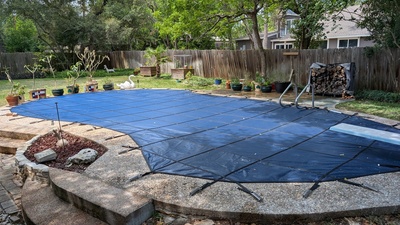
After installation (southeast)
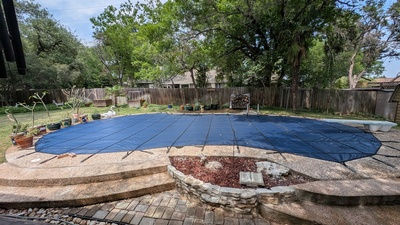
After installation (south wide)
After installation (southwest)
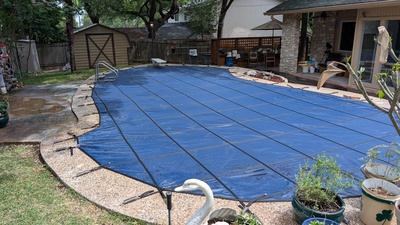
After installation (northwest)
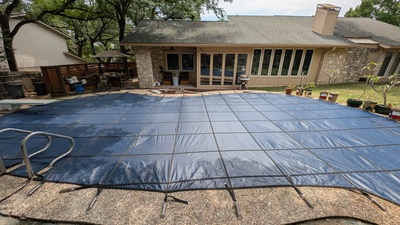
After installation (north)
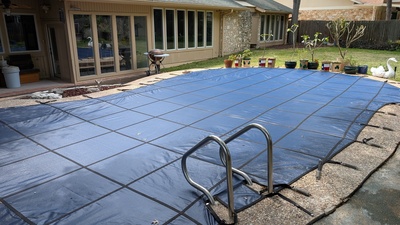
After installation (northeast closer)
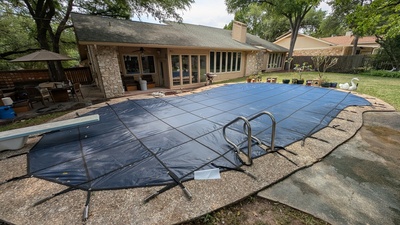
After installation (northeast wide)
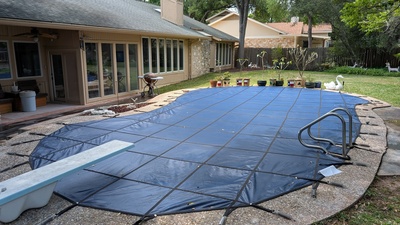
After installation (northeast)
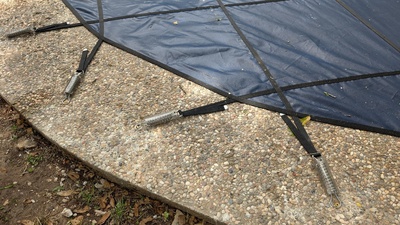
Closeup of a few springs after installation
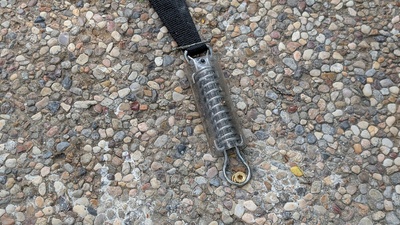
Closeup of a spring
Appendix: Pool Shape Plotting Script
""" Plot the shape of a pool using AB measurements technique. """

from dataclasses import dataclass
import json
import numpy as np
import matplotlib.pyplot as plt
from typing import List, Tuple


@dataclass
class ReferencePoints:
    start_label  : str
    end_label    : str
    distance     : float

    @classmethod
    def from_tuple_data( cls, tuple_data : Tuple[ str, str, int, float ] ):
        return ReferencePoints(
            start_label = tuple_data[0],
            end_label = tuple_data[1],
            distance = ( tuple_data[2] * 12 ) + tuple_data[3],
        )

    def plot( self ):
        plt.scatter( [ 0, self.distance ], [0, 0], color='red', s=100 )
        plt.text( -16, 0, self.start_label,
                  fontsize = 24, fontweight='bold',
                  color='red', verticalalignment='bottom')
        plt.text( self.distance + 8, 0, self.end_label,
                  fontsize=24, fontweight='bold',
                  color='red', verticalalignment='bottom')
        return


@dataclass
class PointPlotter:
    measurement_data     : List[ Tuple[ str, str, int, float ]]
    reference_points     : ReferencePoints

    def __post_init__(self):
        self.triangulated_points = self.triangulate()
        self.sorted_labels = sorted( self.triangulated_points.keys(), key=lambda x: int(x) )
        self.sorted_points = np.array([ self.triangulated_points[label] for label in self.sorted_labels ])
        return

    def plot_extents(self):
        x_min, x_max = min(self.sorted_points[:, 0]), max(self.sorted_points[:, 0])
        y_min, y_max = min(self.sorted_points[:, 1]), max(self.sorted_points[:, 1])
        return ( x_min, y_min, x_max, y_max )

    def plot_points(self, color : str = 'blue' ):
        plt.scatter(self.sorted_points[:, 0], self.sorted_points[:, 1], color=color)
        return

    def plot_labels( self, position_inside : bool = True ):
        if position_inside:
            # Sort the points by numeric label to ensure correct ordering
            # (sorted in clockwise order)
            sorted_by_label_points = [ self.triangulated_points[label] for label in self.sorted_labels ]

            for idx, label in enumerate(self.sorted_labels):
                x, y = self.triangulated_points[label]
                offset_x, offset_y = self.get_outward_offset( idx, sorted_by_label_points )
                plt.text( x + offset_x, y + offset_y, label, fontsize=10,
                          verticalalignment='center', horizontalalignment='center' )
                continue
        else:
            label_offset = 7
            for idx, label in enumerate(self.sorted_labels):
                # Get current vertex and its two neighboring points
                p_prev = self.sorted_points[idx - 1]  # Previous point
                p_curr = self.sorted_points[idx]      # Current vertex
                p_next = self.sorted_points[(idx + 1) % len(self.sorted_points)]  # Next point

                # Compute outward normal for each adjacent edge
                dx1, dy1 = p_curr[0] - p_prev[0], p_curr[1] - p_prev[1]
                dx2, dy2 = p_next[0] - p_curr[0], p_next[1] - p_curr[1]

                # Compute normals (-dy, dx) for both edges
                norm1 = np.array([-dy1, dx1]) / np.sqrt(dx1**2 + dy1**2)
                norm2 = np.array([-dy2, dx2]) / np.sqrt(dx2**2 + dy2**2)

                # Compute average outward normal (normalized)
                outward = (norm1 + norm2) / 2
                outward /= np.linalg.norm(outward)  # Normalize to maintain consistent scaling

                # Compute label position by offsetting in outward direction
                label_x = p_curr[0] + outward[0] * label_offset
                label_y = p_curr[1] + outward[1] * label_offset

                # Place label diagonally from vertex
                plt.text(label_x, label_y, label, ha='center', va='center', fontsize=10, color="red")
                continue
        return

    def plot_curves(self):
        # Draw piecewise Bézier curves

        for i in range(len(self.sorted_points) - 2):
            x_curve, y_curve = self.quadratic_bezier( self.sorted_points[i],
                                                      self.sorted_points[i + 1],
                                                      self.sorted_points[i + 2] )
            plt.plot(x_curve, y_curve, 'g-', alpha=0.7)
            continue

        # Close the shape by interpolating between the last and first points
        x_curve, y_curve = self.quadratic_bezier( self.sorted_points[-2],
                                                  self.sorted_points[-1],
                                                  self.sorted_points[0] )
        plt.plot(x_curve, y_curve, 'g-', alpha=0.7)

        return

    def plot_lines( self, color : str ):
        closed_points = np.vstack([self.sorted_points, self.sorted_points[0]])  # Add first point at the end
        x, y = closed_points[:, 0], closed_points[:, 1]
        plt.plot( x, y, marker="o", linestyle="-", color = color )  # Draw lines between points
        return

    def plot_errors( self,
                     error_check_measurement_data : List[ Tuple[ str, str, int, float ]],
                     error_threshold : float ):
        for p1, p2, feet, inches in error_check_measurement_data:
            if p1 in self.triangulated_points and p2 in self.triangulated_points:
                # Compute expected and actual distances
                measured_distance = (feet * 12) + inches
                computed_distance = np.linalg.norm( np.array(self.triangulated_points[p1])
                                                    - np.array(self.triangulated_points[p2]) )
                error = abs(computed_distance - measured_distance)

                # Highlight points with significant error
                mid_x = (self.triangulated_points[p1][0] + self.triangulated_points[p2][0]) / 2
                mid_y = (self.triangulated_points[p1][1] + self.triangulated_points[p2][1]) / 2

                if error > error_threshold:
                    plt.text( mid_x, mid_y, f"Error: {error:.1f}\"",
                              fontsize=8, color="red", fontweight='bold' )
                    plt.plot([ self.triangulated_points[p1][0], self.triangulated_points[p2][0] ],
                             [ self.triangulated_points[p1][1], self.triangulated_points[p2][1] ],
                             'r--', alpha=0.5, label="High Error"
                             if 'High Error' not in plt.gca().get_legend_handles_labels()[1] else "")
            continue
        return

    def triangulate( self ):
        end_ref_distances = {}
        start_ref_distances = {}

        for reference_label, point_label, feet, inches in self.measurement_data:
            total_inches = ( feet * 12 ) + inches
            if reference_label == self.reference_points.end_label:
                end_ref_distances[point_label] = total_inches
            else:
                start_ref_distances[point_label] = total_inches
            continue

        # Compute coordinates of plotted points using triangulation
        plot_points = {}

        for label in end_ref_distances.keys() & start_ref_distances.keys():
            a = end_ref_distances[label]
            b = start_ref_distances[label]
            c = self.reference_points.distance

            # Law of cosines: cos(A) = (b² + c² - a²) / (2bc)
            cos_A = ( b**2 + c**2 - a**2 ) / ( 2 * b * c )
            cos_A = np.clip(cos_A, -1, 1)  # Avoid rounding errors
            angle_A = np.arccos( cos_A )  # Angle in radians

            # Convert to new coordinate system: start is (0,0), end is at (reference_distance, 0)
            x = b * np.cos( angle_A )
            y = b * np.sin( angle_A )
            plot_points[label] = (x, y)
            continue
        return plot_points

    def get_outward_offset( self, idx, points, offset_dist = 10 ):
        """Compute outward offset using tangent vector and 90-degree rotation."""
        num_points = len(points)
        next_idx = (idx + 1) % num_points  # Next point in sequence (wrap around)

        # Compute tangent vector (pointing along shape perimeter)
        tangent = np.array(points[next_idx]) - np.array(points[idx])

        # Compute outward normal by rotating tangent -90 degrees (clockwise normal)
        normal = np.array([tangent[1], -tangent[0]])  # Rotate tangent 90° clockwise

        # Normalize and scale outward
        normal = normal / np.linalg.norm(normal) * offset_dist

        return normal[0], normal[1]

    def quadratic_bezier( self, p1, p2, p3, num = 30 ):
        """Generate points for a piecewise quadratic Bézier curve between p1, p2 (control), and p3."""
        t = np.linspace(0, 1, num)[:, np.newaxis]  # Ensure t is column vector for broadcasting
        p1, p2, p3 = map(np.array, [p1, p2, p3])  # Convert tuples to NumPy arrays
        curve = (1 - t)**2 * p1 + 2 * (1 - t) * t * p2 + t**2 * p3
        return curve[:, 0], curve[:, 1]  # Return x and y values separately


if __name__ == '__main__':

    error_checking_enabled = False
    obstruction_closeup = False

    data_filename = 'pool-measurements.json'
    plot_scale_factor = 1.30
    error_threshold = 0.5  # Inches
    margin = 5

    with open( data_filename, 'r' ) as fh:
        data = json.load( fh )

    reference_points = ReferencePoints.from_tuple_data(
        tuple_data = data['reference_points'],
    )
    pool_edge_measurement_data = data['pool_edge_points']
    error_check_measurement_data = data['diagonals']

    obstruction_measurement_data_list = [
        data[x] for x in [ 'ladder_extents_R', 'ladder_extents_L', 'diving_platform' ]
    ]

    plt.figure( figsize=( 8 * plot_scale_factor, 6 * plot_scale_factor ) )
    reference_points.plot()

    pool_edge_plotter = PointPlotter(
        measurement_data = pool_edge_measurement_data,
        reference_points = reference_points,
    )
    pool_edge_plotter.plot_points()
    pool_edge_plotter.plot_curves()
    pool_edge_plotter.plot_labels( position_inside = True )
    plot_x_min, plot_y_min, plot_x_max, plot_y_max = pool_edge_plotter.plot_extents()

    if error_checking_enabled:
        pool_edge_plotter.plot_errors(
            error_check_measurement_data = error_check_measurement_data,
            error_threshold = error_threshold,
        )

    if obstruction_closeup:
        plot_x_min = 0.0
        plot_y_min = 0.0
        plot_x_max = -99999999.0
        plot_y_max = -99999999.0
        margin = 10

    for obstruction_measurement_data in obstruction_measurement_data_list:
        obstruction_plotter = PointPlotter(
            measurement_data = obstruction_measurement_data,
            reference_points = reference_points,
        )
        obstruction_plotter.plot_points(
            color = 'red',
        )
        obstruction_plotter.plot_lines( color = 'red' )
        obstruction_plotter.plot_labels( position_inside = False )

        x_min, y_min, x_max, y_max = obstruction_plotter.plot_extents()
        plot_x_min = min( plot_x_min, x_min )
        plot_y_min = min( plot_y_min, y_min )
        plot_x_max = max( plot_x_max, x_max )
        plot_y_max = max( plot_y_max, y_max )
        continue

    plt.axis('equal')  # Ensures equal scaling of x and y axes
    #plt.margins( margin )  # Remove automatic padding around data

    # Formatting
    plt.axhline( 0, color='black', linewidth = 0.5 )
    plt.axvline( 0, color='black', linewidth = 0.5 )
    plt.xlabel( "(inches)" )
    plt.ylabel( "(inches)" )

    # Define the grid lines and label positions
    major_ticks = np.arange( -500, 500, 50 )  # Labels at every 50 inches
    minor_ticks = np.arange( -500, 500, 10 )  # Grid lines at every 10 inches

    # Set grid and ticks
    plt.xticks(major_ticks)  # Major ticks every 50 inches (labeled)
    plt.yticks(major_ticks)  # Major ticks every 50 inches (labeled)

    plt.grid( True, which='both', linestyle='-', linewidth=0.5 )  # Enable grid
    plt.minorticks_on()  # Enable minor ticks for the 10-inch grid

    # Set minor ticks at every 10 inches without labels
    plt.gca().set_xticks( minor_ticks, minor = True )
    plt.gca().set_yticks( minor_ticks, minor = True )

    plt.xlim( plot_x_min - margin, plot_x_max + margin )  # Reduce extra space but leave 5 units padding
    plt.ylim( plot_y_min - margin, plot_y_max + margin )
    plt.tight_layout()  # Ensures best use of space

    plt.show()